
IPTV Smart Plus+
Axxel AppEntertainment
4.215.00 Reviews
- Version
- Varies With Device
- Installs
- 10.00K
- Age Rating
- Everyone
Screenshots
Our Review of IPTV Smart Plus+
 Analysis by Appyee
I judge an IPTV player less by how many options it promises than by how much effort it asks of the person using it. Can I find a channel without hunting through a long list? Can someone who is not confident with technology get through setup? And does the app make sense in a shared home, where different people may watch in different ways? Those questions matter especially with IPTV Smart Plus+, an entertainment app from Axxel App that is designed to play content you bring yourself rather than supply a library of channels.
Who will find this kind of player useful?
This app is most appealing if you already have a legitimate IPTV playlist and want a single place to organize and watch it. That is a different proposition from subscribing to a conventional streaming service, where the catalogue is ready as soon as you sign in. Here, the player is only one part of the arrangement: you need a compatible source and must be comfortable adding it. If you expect to install an app and immediately browse a built-in collection of films or live channels, this is not the right fit.
That distinction also changes how I compare it with familiar alternatives. A subscription streaming app usually handles the content catalogue, account and recommendations for you, but it generally does not serve as a flexible player for a playlist you manage separately. A basic IPTV player may be enough if you only want to open a source and watch. The attraction here is the combination of playlist and EPG handling, customization, and the features described for viewing and family use. The trade-off is that those options are useful only when your source supports them and you are willing to do some setup.
Readability, navigation, and the first setup decisions
The original impression of a clean, straightforward interface is encouraging, but simple-looking screens do not remove every setup decision. A newcomer still needs to know where their playlist comes from, how to enter it, and whether an EPG is available for that source. I would gather those details before opening the app. Doing so avoids mistaking a player setup problem for a failure of the channels themselves, and makes the first session much less frustrating.
The EPG can be particularly useful for people who find an unstructured channel list difficult to scan. Instead of opening channels one by one to see what is on, a guide gives viewing a more familiar schedule-based shape. My practical tip is to treat the guide as a navigation aid, not as proof that every channel will have complete programme details: the information still depends on the content source. If the guide looks sparse, checking the source configuration is a better first move than repeatedly changing the app’s appearance.
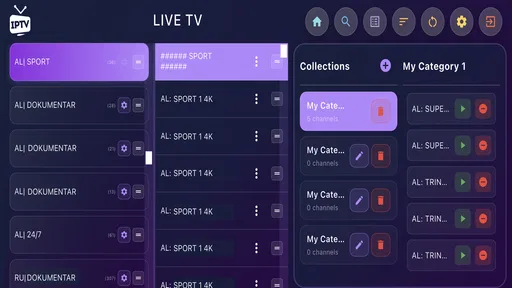
Favorites and channel organization can also reduce unnecessary scrolling. I would set up a small group of frequently watched channels first rather than trying to perfect the entire playlist on day one. That is a more accessible workflow for anyone who gets overwhelmed by long menus, and it keeps a household’s most-used choices near the front. If several people share the device, agreeing on a simple organization scheme can prevent one person’s cleanup from making another person’s viewing harder.
Setting Up: As Easy as Pie
Getting started with IPTV Smart Plus+ is surprisingly simple. You don’t need to be a tech whiz to figure this one out. Just download the app from your respective store – it’s available on both Android and iOS, which is a big win if you ask me. Once you’ve got it on your device, you can jump right into the setup process.
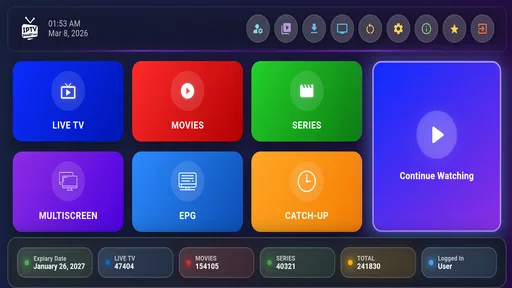
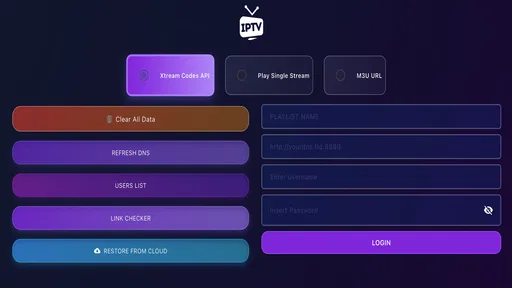
Now, the first thing you’ll notice is the clean and straightforward interface. It’s intuitive, which means you won’t find yourself scratching your head trying to navigate through a maze of options. The app guides you through adding playlists or EPGs (Electronic Program Guides) with ease. A quick note – you’ll need to have your own content to load onto the app since it doesn’t provide any channels itself. But don’t worry, it supports a wide range of formats, so you’re covered.
User Experience: Smooth Sailing
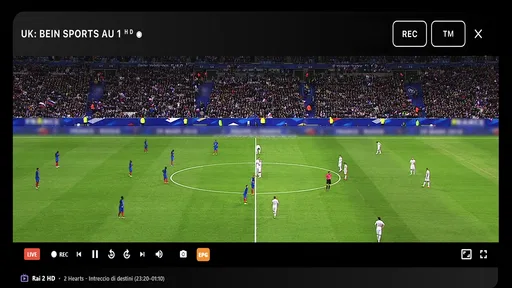
Once you’re set up, the user experience is quite a delight. The app runs smoothly without any noticeable hiccups, and the streaming quality is top-notch. I was impressed with how IPTV Smart Plus+ handles high-definition content without buffering or lagging, even when my Wi-Fi was throwing a tantrum.
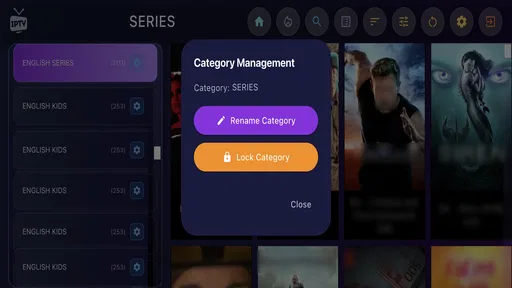
One of the standout features for me is the customization options. You can tailor the interface to your liking, which is a godsend if you’re particular about your viewing experience. Whether it’s organizing your channels or setting up favorites, it’s all at your fingertips.
Motor and sensory considerations at home
A television player often gets used from the sofa, at arm’s length, or while someone is splitting attention between the screen and the room. In those situations, reducing repeated navigation matters more than having a deep menu of settings. Favorites and a well-organized list can help someone with limited dexterity avoid lots of small, repeated selections. They are practical ways to reduce effort, though they are not a substitute for dedicated accessibility controls.
For viewers sensitive to bright screens, motion, or busy visual layouts, the sensible approach is to test a short session and see how the display feels in the actual viewing environment. I would avoid assuming that customization automatically means adjustable text size, contrast, captions, or other specific accessibility options; those should be checked directly on the device and in the app before relying on them. If a viewer needs a particular control to follow programmes comfortably, confirming it first is more useful than discovering the limitation during a family movie night.
Features to Love
Let’s talk features. This app packs quite a punch! Here are some of the highlights:
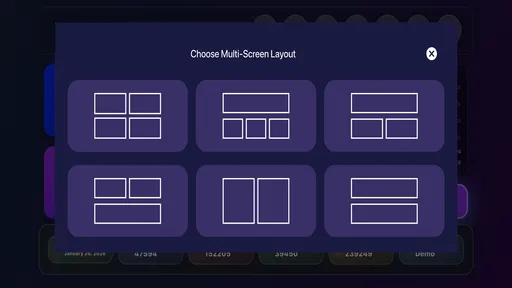
- Multi-Screen Support: Watch on multiple devices simultaneously, which is perfect for families or roommates.
- Parental Controls: Keep the kids safe with easily configurable restrictions.
- Catch-Up TV: Never miss a show again! This feature lets you rewind and catch up on missed episodes.
- EPG Support: The electronic program guide is comprehensive and easy to navigate, so you always know what’s on.
These features enhance the overall utility of the app, making it a solid choice for anyone looking to consolidate their viewing experience.
A realistic shared-viewing routine
Imagine coming home after work and wanting the evening news while another person in the household plans to watch a different programme. With a compatible source and the multi-screen option, the app’s stated support for simultaneous viewing may suit that arrangement better than taking turns on one screen. I would still check that the playlist and devices are set up for the intended use; an app feature cannot make an unsuitable source work or remove the need to configure each viewer’s access.
For a less technical family member, I would prepare the essentials in advance: load the playlist, confirm the guide is populated, and place the usual channels in favorites. Then show them the few actions they need for an ordinary evening rather than walking through every setting. Parental controls may be useful in a home with children, but they should be configured deliberately and checked from the child’s point of view; restrictions are only helpful when the adults understand what they block and when the controls are active.
Situational access and the limits of convenience
Because this is a player for supplied content, access depends on more than the app itself. At home, a stable connection and a source that works well with the player are likely to make the experience feel straightforward. Away from home, the practical question is whether the viewer’s source and connection remain suitable. I would not plan an important viewing session around an untested setup; trying the playlist in the place and on the device you intend to use is a simple way to catch problems early.
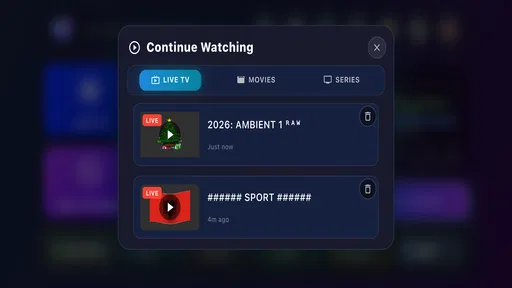
Catch-up viewing can be valuable for people whose schedules do not line up with a live broadcast, but it depends on the content source supporting the relevant programme. The same principle applies to guide details and channel availability: the player organizes what it can access, while the source determines much of what appears. That division of responsibility is worth understanding before paying for an app or arranging a household around it. IPTV Smart Plus+ costs $2.49, so I would first decide whether its player features solve a real need in my setup rather than treating the price as a substitute for checking compatibility.
The app is rated for Everyone, has an average rating of 4.2 from around 1.4 thousand ratings, and has more than 10 thousand installs. It was released on December 27, 2024, and its minimum operating-system requirement is version 7.0. Those details help set expectations about its audience and availability, but they do not answer the personal question that matters most: whether the app’s controls and the viewer’s IPTV source work well together.
Features to Love
Let’s talk features. This app packs quite a punch! Here are some of the highlights:
- Multi-Screen Support: Watch on multiple devices simultaneously, which is perfect for families or roommates.
- Parental Controls: Keep the kids safe with easily configurable restrictions.
- Catch-Up TV: Never miss a show again! This feature lets you rewind and catch up on missed episodes.
- EPG Support: The electronic program guide is comprehensive and easy to navigate, so you always know what’s on.
These features enhance the overall utility of the app, making it a solid choice for anyone looking to consolidate their viewing experience.
Is It Worth It?
So, is IPTV Smart Plus+ the app you didn’t know you needed? In my opinion, it absolutely is. It takes the chaos out of streaming, offering you a reliable and user-friendly way to enjoy your content. Whether you’re a binge-watcher or just someone who likes to keep up with the news, this app has something for everyone.
However, it’s worth mentioning that since the app doesn’t provide its own content, you’ll need to source your own playlists. But once you’ve got that sorted, it’s smooth sailing from there. The app’s compatibility with various formats and its robustness in handling HD content make it a must-have for streaming aficionados.
Who should choose another option?
I would steer away from this player if I want one paid subscription that includes a ready-made catalogue, or if I do not want to manage a playlist and its guide. A mainstream streaming service is the simpler choice for that kind of hands-off viewing. I would also hesitate if a family member depends on a specific accessibility feature and I have not tested it in practice. A familiar device interface or another player with controls I can verify may be the safer option in that case.
My overall recommendation is narrower than “something for everyone”: this makes sense for people who already have a suitable source and value organizing it, using a guide, and making viewing more flexible across a household. Before settling in, test the channels you use most, check the guide, try the controls that matter to each viewer, and confirm that any catch-up or parental restrictions behave as expected. That small trial gives a much clearer answer than a feature list alone.
In conclusion, if you’re tired of juggling multiple apps or just want a more streamlined way to enjoy your favorite shows and channels, give IPTV Smart Plus+ a go. It’s like having a personal TV assistant right in your pocket. Happy streaming!
Verdict
Strengths of IPTV Smart Plus+
- User-friendly interface for easy navigation.
- Supports a wide range of video formats.
- Customizable playlists for personal preferences.
- High-definition streaming with minimal buffering.
- Cross-platform support for Android and iOS.
Limitations of IPTV Smart Plus+
- Some features require in-app purchases.
- Occasional ads can interrupt viewing.
- Limited offline content download options.
- Initial setup can be confusing for beginners.
- Not all channels are available in all regions.
Similar Picks in This Category
View All
Google Play Games
Google LLC3.9

Netflix
Netflix, Inc.4.8

YouTube Kids
Google LLC4.2

Disney+
Disney4.4

Prime Video
Amazon Mobile LLC4.7

Steam
Valve Corporation3.2
Frequently Asked Questions
What is IPTV Smart Plus+ and how does it work?
IPTV Smart Plus+ is an application that allows users to stream live television channels over the internet. It works by connecting to IPTV services, which provide access to channel lists and streaming links. Users need to have an IPTV service subscription to use the app effectively.
Is IPTV Smart Plus+ compatible with my device?
IPTV Smart Plus+ is compatible with a wide range of devices, including Android and iOS smartphones and tablets. Additionally, it can be used on smart TVs and streaming devices that support app installations. Always check the device’s specifications to ensure compatibility.
Do I need a subscription to use IPTV Smart Plus+?
Yes, while the app itself may be free or require a one-time purchase, it requires an IPTV service subscription to access content. The app serves as a platform to stream channels provided by your IPTV service provider, so a valid subscription is essential.
How user-friendly is the IPTV Smart Plus+ interface?
IPTV Smart Plus+ is known for its intuitive and user-friendly interface. It offers easy navigation through categories, a search feature to find channels quickly, and options to customize the viewing experience. New users typically find it straightforward to use without needing extensive instructions.
Is content from IPTV Smart Plus+ available in high definition?
The availability of high-definition content on IPTV Smart Plus+ depends on your IPTV service provider. Most modern providers offer HD streaming options, but the final quality will also depend on your internet connection speed. It’s recommended to have a stable high-speed connection for optimal streaming.
